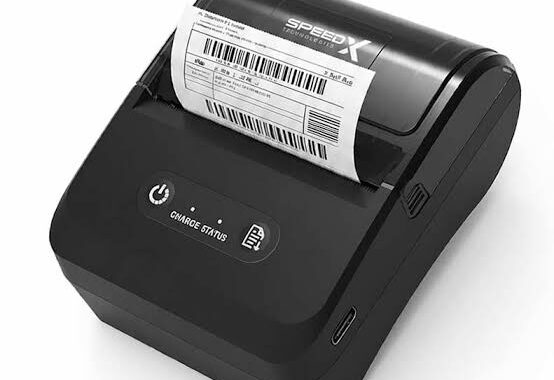

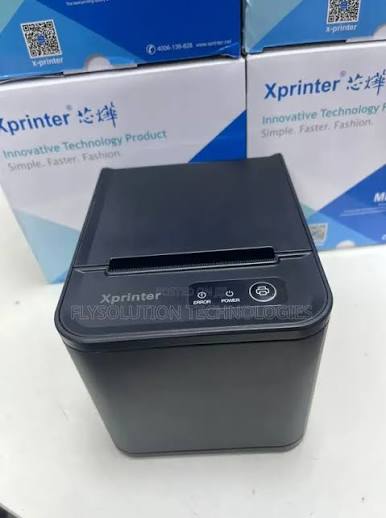
Receipt printing technology continues to evolve as businesses adopt more advanced point-of-sale systems, digital payment methods, and connected business applications. Retailers, restaurants, supermarkets, and service providers increasingly expect printing equipment to deliver reliable performance while supporting flexible installation and efficient transaction processing. These changing requirements are encouraging manufacturers to improve printer design, connectivity, software compatibility, and energy efficiency.
As technology develops, businesses will need to consider how new printing capabilities can support their operational goals. An Xprinter Receipt Printer can be evaluated within this broader technological landscape, particularly when organizations are reviewing equipment for modern POS environments. Understanding potential innovations helps businesses prepare for changes in receipt printing and transaction management.
The Evolution of Receipt Printer Technology
Traditional receipt printing systems were primarily designed to produce transaction records from cash registers and desktop POS terminals. Modern printers must support more complex environments involving touchscreen terminals, mobile devices, network connections, and integrated payment platforms.
Thermal printing has become widely used in these applications because it does not require traditional ink cartridges or ribbons. It uses heat-sensitive paper to produce text and graphics, allowing fast printing through a relatively compact mechanism.
Future developments are likely to build on this technology while addressing demands for greater connectivity, improved reliability, easier maintenance, and better integration with business software.
Advancements in Thermal Printing Performance
Printing speed and output quality remain important areas for technological improvement. Businesses want printers that can produce readable receipts quickly, particularly in high-traffic environments where transaction delays affect customer service.
Future thermal printing systems may focus on improvements in several areas:
Faster Printing Mechanisms
Advances in print-head design and internal processing may help improve printing performance. Faster output can support supermarkets, restaurants, and other businesses that handle frequent transactions.
However, speed must be balanced with consistent print quality and equipment durability. A printer that operates quickly but produces unclear receipts may create additional work for employees.
Improved Print Resolution
Higher-resolution printing can improve the appearance of small text, logos, barcodes, and detailed transaction information. This may be particularly useful for businesses that use receipts for product identification, promotional messages, or customer references.
Developments in print-head technology and software processing could help manufacturers improve output consistency across different receipt formats.
More Consistent Printing Quality
Future designs may also focus on maintaining uniform print density and reducing common output problems. Better control of thermal energy and improved internal components could contribute to more consistent results.
Businesses should still use compatible thermal paper and follow recommended maintenance procedures to achieve the intended performance.
Greater Connectivity and Wireless Integration
Connectivity is one of the most important areas shaping modern receipt printer development. Traditional USB and serial connections remain useful, but businesses increasingly operate POS systems that include network-connected and mobile devices.
Future printer designs may offer more flexible integration through improved Ethernet, Bluetooth, and Wi-Fi capabilities. These connections can support different installation arrangements depending on the business environment.
Network-Based Printing
Network connectivity allows compatible printers to communicate with POS terminals through a local business network. This can be useful in larger retail stores, restaurants, and multi-station service environments.
Future improvements may simplify printer discovery, configuration, and management across connected workstations.
Mobile POS Compatibility
Mobile checkout systems are becoming more common in restaurants, temporary retail locations, and service businesses. Better wireless integration may make it easier to connect compatible printers with tablets and smartphones.
Manufacturers will need to consider operating system support, connection stability, and application compatibility as mobile POS platforms continue to develop.
Integration with Cloud-Based Business Systems
Cloud-based POS platforms allow businesses to access transaction information and manage operations through internet-connected applications. These systems can support centralized reporting, inventory management, and coordination between different locations.
Receipt printers may increasingly operate as connected components within these environments. Improved software interfaces, compatible printing services, and easier network configuration could simplify their integration.
However, cloud compatibility is not automatic. A printer must support the required software, drivers, applications, and communication methods. Businesses should verify these requirements before selecting equipment for a cloud-based installation.
Smarter Printer Management and Diagnostics
As businesses use more connected equipment, managing printers across multiple locations can become challenging. Technical problems may interrupt checkout operations, especially when employees are unable to identify the cause quickly.
Future receipt printers may incorporate more advanced diagnostic and monitoring capabilities. Depending on implementation, these features could help users identify conditions such as paper shortages, communication errors, or hardware faults.
Potential developments include:
- More detailed printer status information.
- Easier configuration through management software.
- Improved error reporting.
- Remote monitoring for compatible network environments.
- Simplified firmware and driver management.
- More accessible troubleshooting guidance.
Such capabilities could reduce the time required to diagnose common issues. Their practical value will depend on software support and the specific features provided by each model.
Improvements in Compact and Energy-Efficient Designs
Businesses often need printing equipment that fits into limited workspaces. This is especially relevant for small retail counters, cafés, kiosks, and reception desks where several devices share a restricted area.
Future product development may focus on reducing equipment size while maintaining useful printing performance. Improvements in internal component layout and mechanical design could help manufacturers create more space-efficient products.
Energy efficiency is another area of interest. Manufacturers may continue exploring improvements in power management, standby operation, and internal component efficiency. These changes could help reduce unnecessary energy consumption during normal business operations.
Compact design and energy efficiency should still be evaluated alongside reliability, cooling requirements, and expected transaction volume.
Better Paper Handling and Consumable Management
Paper handling has a direct effect on receipt printer usability. Incorrectly loaded rolls, incompatible paper dimensions, and paper jams can interrupt daily operations.
Future designs may introduce improvements to paper-loading mechanisms, compartment accessibility, and paper detection. These developments could make routine replacement easier for employees and reduce interruptions in busy workplaces.
Thermal paper technology may also continue to evolve. Improvements in coating consistency and paper durability could support clearer output and better resistance to certain environmental conditions.
Businesses will still need to select paper that meets the exact specifications of their printer models. New paper technologies must be compatible with the thermal print head and intended operating settings.
Supporting Sustainability in Receipt Printing
Environmental considerations are influencing purchasing decisions across many industries. Receipt printing involves paper consumption, energy use, packaging, and the disposal of used supplies.
Manufacturers may respond by developing more efficient printing mechanisms and designing products that support longer service life. Better component durability and maintenance access can also help reduce premature equipment replacement.
Businesses can contribute to more responsible printing practices by:
- Selecting receipt lengths appropriate for transaction requirements.
- Avoiding unnecessary duplicate receipts.
- Using compatible paper from suppliers with consistent quality.
- Maintaining printers to extend their useful operating life.
- Exploring digital receipts where customers and business processes support them.
- Following appropriate recycling and disposal practices.
Sustainability improvements will likely involve both equipment design and the way businesses manage their receipt printing activities.
Integration with Digital Payments and Omnichannel Retail
Payment methods are becoming more diverse as customers use bank cards, contactless payments, mobile wallets, and other digital transaction options. POS systems must coordinate these payment methods with accurate transaction records.
Receipt printers will continue to play a role in providing physical confirmation of completed transactions. Future developments may focus on smoother integration between payment terminals, POS applications, and printing devices.
Retailers are also adopting omnichannel approaches that connect online orders, in-store purchases, returns, and customer accounts. Printing systems may need to support increasingly detailed transaction formats generated by these integrated platforms.
A reliable connection between POS software and printing equipment will remain essential as these workflows become more complex.
Factors Businesses Should Consider When Evaluating New Technology
Not every new feature will provide equal value to every business. Organizations should evaluate technology according to their transaction requirements, existing equipment, and long-term plans.
| Development area | Potential business benefit | Important consideration |
|---|---|---|
| Faster printing | Shorter transaction processing time | Output quality and workload suitability |
| Wireless connectivity | More flexible installation | Device and software compatibility |
| Cloud integration | Support for connected POS workflows | Network and application requirements |
| Smart diagnostics | Easier troubleshooting | Availability of monitoring features |
| Compact design | Better use of counter space | Printing performance and paper capacity |
| Energy efficiency | Reduced unnecessary power use | Actual operating specifications |
| Improved paper handling | Easier roll replacement | Supported paper dimensions |
Businesses should compare actual product specifications rather than assuming that every printer includes the latest technologies.
The Importance of Manufacturer Support and Product Development
Technological innovation involves more than introducing new hardware features. Manufacturers also need to provide compatible drivers, firmware updates, installation instructions, and technical documentation.
These resources help businesses integrate receipt printers into changing POS environments. They are particularly important when organizations upgrade their operating systems, replace payment terminals, or introduce new business applications.
When evaluating an Xprinter receipt printer, businesses should review the specifications of the individual model and check the availability of relevant support resources. This helps ensure that the equipment meets current requirements and can be maintained effectively.
Conclusion
Future receipt printer technology is likely to develop around faster printing, improved connectivity, cloud integration, smarter diagnostics, compact designs, and more efficient resource use. These innovations reflect the changing needs of businesses that rely on connected POS systems and consistent transaction documentation.
Xprinter receipt printers can be assessed within these broader developments by examining their actual features, compatibility, and intended applications. Businesses that understand emerging technology trends and compare them with their operational requirements will be better prepared to select receipt printing equipment that supports both present needs and future changes.