

Retail stores and hospitality businesses rely on point-of-sale equipment to manage transactions, payments, orders, and other routine activities. Although both sectors use POS technology, their operational requirements can differ considerably.
Choosing the right equipment starts with understanding those differences and identifying a manufacturer capable of supporting the required setup. Businesses can review options such as POS Hardware Manufacturer when assessing hardware capabilities, compatibility, and long-term suitability for their operations.
POS Hardware Requirements in Retail
Retail businesses often process transactions involving individual products, variations, prices, promotions, and inventory records. Their POS hardware needs to support fast and accurate product identification.
Barcode scanners, receipt printers, cash drawers, touchscreen terminals, and customer displays are common components. Larger stores may also require multiple checkout stations connected to a central system.
POS Hardware Requirements in Hospitality
Hospitality environments can have a different workflow. Restaurants, cafés, hotels, and other service businesses may need hardware that supports orders, tables, payments, and communication between different areas.
For example, a restaurant may use POS terminals for taking orders while kitchen printers or displays communicate order details to preparation staff. The hardware needs to fit naturally into the movement of employees and customers.
Choosing the Right POS Terminal
The POS terminal is usually at the center of the hardware setup. Retail businesses may prioritize screen visibility, processing performance, and product-search functionality.
Hospitality businesses may place greater emphasis on compact designs, touchscreen responsiveness, and convenient positioning. In either case, the terminal should provide enough performance for the POS software and expected workload.
Barcode Scanners for Retail
Barcode scanners can significantly simplify product entry in retail environments. Instead of manually entering product codes, employees can scan items and retrieve associated information through the POS system.
When selecting scanners, businesses should consider scanning speed, accuracy, connectivity, supported barcode types, and compatibility with their software environment.
Payment Hardware for Both Sectors
Payment processing is important in both retail and hospitality. Customers may expect to pay using cards, contactless methods, mobile wallets, or other supported options.
Payment devices should integrate appropriately with the POS system and support the transaction methods required by the business. Reliable payment hardware can also help minimize unnecessary delays at checkout.
Receipt Printing and Cash Management
Receipt printers remain useful for businesses that provide physical transaction records. Retail stores may print receipts for individual purchases, while restaurants may use printers as part of order or payment workflows.
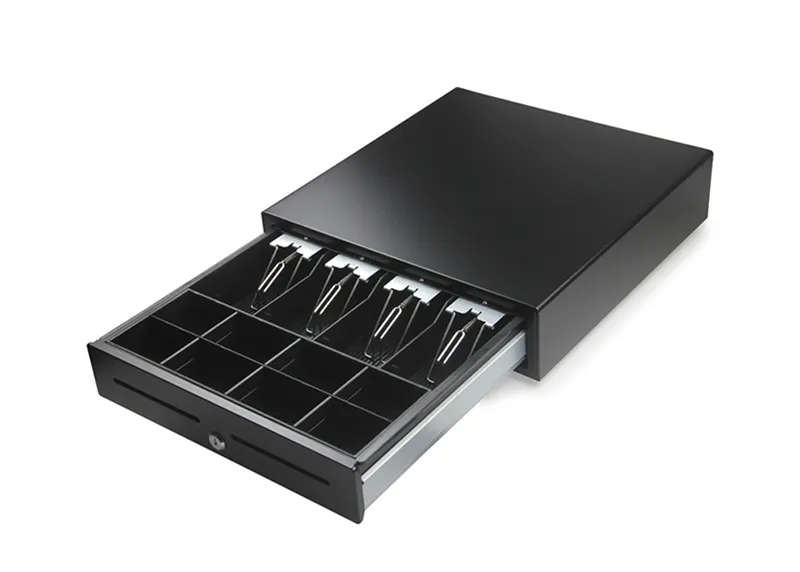
Cash drawers are also relevant to businesses that accept cash. Both components should be compatible with the selected POS system and suitable for the expected level of use.
Customer-Facing Equipment
Customer displays can improve transaction transparency by allowing customers to see products, prices, totals, or payment information during checkout.
In retail, this can help customers verify their purchases. In hospitality, customer-facing technology may serve different purposes depending on the ordering and payment workflow.
Hardware for Multi-Station Environments
Larger retailers and hospitality businesses may operate several POS stations. A retail store could have multiple checkout counters, while a restaurant may use separate terminals for hosts, servers, bar staff, or payment processing.
A manufacturer should be able to support a hardware environment where multiple components operate together. Network connectivity and centralized management become increasingly important as the number of devices grows.
Connectivity and Integration
POS hardware does not operate in isolation. Terminals need to communicate with scanners, printers, payment devices, displays, and software systems.
Businesses should review connection options such as USB, Ethernet, Wi-Fi, Bluetooth, and other supported interfaces. Compatibility should be confirmed before purchasing individual components.
Durability in Busy Environments
Retail and hospitality equipment may be used repeatedly throughout the day. A busy checkout counter or restaurant workstation can place considerable demands on POS hardware.
Businesses should therefore consider commercial-grade construction, expected operating life, ease of maintenance, and resistance to everyday wear when evaluating equipment.
Software Compatibility
Hardware specifications are only useful if the equipment works with the required POS software. Businesses should verify operating system requirements, drivers, supported peripherals, and integration capabilities.
This is especially important when combining components from different manufacturers. A compatible hardware ecosystem can reduce installation and troubleshooting challenges.
Support and Maintenance
POS equipment supports revenue-generating activities, so technical problems can have an immediate operational impact. Manufacturers and suppliers should provide clear information about warranty coverage, repairs, replacement parts, and technical assistance.
Businesses should understand how support requests are handled before purchasing. Accessible support can be particularly valuable for locations that depend on POS equipment throughout extended operating hours.
Scalability for Growing Operations
Retailers and hospitality businesses may expand over time. Growth can involve new locations, additional checkout stations, larger product catalogs, or higher transaction volumes.
POS hardware should ideally provide enough flexibility to accommodate these changes. Choosing scalable components can help businesses add equipment without redesigning their entire POS environment.
Comparing Manufacturers
When comparing POS hardware manufacturers, businesses can evaluate several areas:
| Factor | Why It Matters |
|---|---|
| Product range | Helps create a complete hardware setup |
| Compatibility | Reduces software and peripheral integration issues |
| Build quality | Supports frequent commercial use |
| Connectivity | Enables communication between devices |
| Support | Helps resolve technical problems |
| Warranty | Provides protection for the investment |
| Scalability | Supports future expansion |
| Total cost | Provides a clearer view of long-term value |
This approach allows businesses to compare manufacturers based on operational requirements rather than price alone.
Retail and Hospitality Require Different Priorities
Although retail and hospitality share many POS components, their workflows should influence hardware decisions. Retail environments often focus heavily on product scanning and inventory-related processes.
Hospitality operations may place greater emphasis on order management, employee mobility, kitchen communication, and service speed. Understanding these differences helps businesses choose equipment that fits their specific environment.
Final Thoughts
The right POS hardware manufacturer can provide the foundation for a reliable technology setup across retail and hospitality operations. However, choosing equipment should involve more than reviewing product specifications or upfront prices.
Businesses should consider compatibility, durability, connectivity, payment requirements, support, scalability, and the specific workflow of their industry. By evaluating these factors together, organizations can build a POS environment that supports efficient daily operations and adapts to future requirements.