
Desktop fabrication has changed the way makers, hobbyists, designers, and small workshops turn digital ideas into physical products. Instead of relying entirely on large industrial machinery, users can now work with compact CNC routers, laser engravers, and specialized accessories designed for smaller workspaces. Twotrees is part of this growing desktop fabrication market, offering equipment and supporting products for woodworking, engraving, prototyping, customization, and DIY projects. Understanding how these machines work and which setup fits a particular project can make the difference between an efficient workshop and an unnecessarily complicated one.
What Is Twotrees and What Does It Offer?
Twotrees provides desktop-oriented fabrication equipment covering several stages of the digital making process. Its product range includes CNC routers, laser engravers, machine accessories, replacement components, and software-related resources. This variety allows users to build a setup around their specific fabrication needs rather than treating one machine as a solution for every material and project.
The appeal of desktop fabrication is largely its flexibility. A hobbyist may want to carve lettering into wood, while a small business owner could need repeatable engraving for personalized products. A designer may use a CNC machine for prototypes, whereas another maker may need a laser system for detailed surface marking. Having access to different machine categories and compatible upgrades makes it easier to adapt a workspace as project requirements evolve.
CNC Routers for Woodworking and Digital Manufacturing
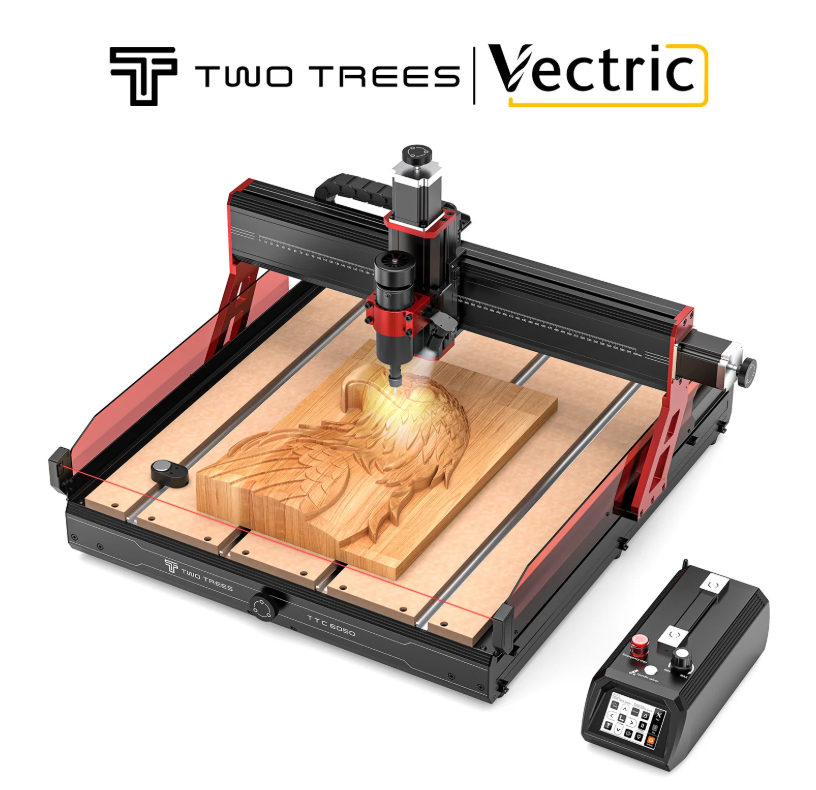
CNC routers are designed to remove material using a rotating cutting tool controlled by digital instructions. They are particularly useful for woodworking, carving, sign making, panel work, prototyping, and other applications where physical cutting or shaping is required. Compared with manual routing, computer-controlled movement can provide more repeatable results when the design, tool selection, workholding, and machine settings are properly configured.
For makers exploring desktop CNC machining, the working area is one of the first specifications worth considering. A larger work area can accommodate bigger panels, while a compact machine may be easier to place on a desk or small workshop bench. Users should also consider spindle capability, compatible tooling, material thickness, machine rigidity, and the type of projects they expect to produce regularly.
Choosing the Right CNC Setup
Selecting a CNC router should begin with the intended application rather than the machine’s appearance or headline specifications. Someone primarily working with thin plywood may have different requirements from a user creating deeper cuts in hardwood. Tool diameter, cutting depth, feed rate, workholding, and dust management all influence the final result.
CNC accessories can also change the usefulness of a router significantly. Depending on machine compatibility, accessories may include router bits, dust collection equipment, rotary modules, tool setters, cooling components, or other workshop upgrades. TwoTrees currently offers dedicated CNC accessory categories and model-specific components, making compatibility an important consideration before purchasing an upgrade.
Laser Engravers for Detailed Customization
Laser engravers approach fabrication differently from CNC routers. Instead of using a physical cutting bit, a focused laser beam interacts with the material to mark, engrave, or, depending on the machine and material, cut a surface. This makes laser technology particularly attractive for personalized products, decorative work, signage, patterns, logos, and detailed designs.
Laser engraving can be useful when fine surface detail is more important than mechanical material removal. Makers can experiment with artwork, text, patterns, and product personalization while working with suitable materials and appropriate machine settings. However, the actual result depends on factors such as laser power, speed, focus, material characteristics, and the number of passes.
Why Laser Accessories Matter
A laser engraver is not always limited to its basic frame and laser module. Laser engraver accessories can improve workflow, material handling, cutting conditions, and the range of projects a machine can support. TwoTrees’ current accessory range includes options such as air-assist equipment, honeycomb work surfaces, rotary attachments, extension kits, risers, and model-specific components.
For example, an air-assist system can be useful for managing the cutting area, while a honeycomb workbench can provide a more suitable surface for certain laser cutting applications. Rotary attachments can open opportunities for engraving cylindrical objects, while extension kits can increase the usable working area on compatible machines. The important point is that an accessory should solve a real workshop requirement rather than simply adding another component to the setup.
CNC Routers vs. Laser Engravers: Which Technology Fits?
The choice between a CNC router and a laser engraver depends heavily on the type of work being performed. CNC routers physically cut and carve material, making them well suited to applications involving depth, shaping, pockets, contours, and three-dimensional woodworking. Laser engravers are generally more attractive for detailed marking, surface engraving, personalization, and certain cutting applications where the material and machine specifications allow it.
Neither technology is automatically suitable for every project. A maker producing carved wooden signs may benefit from CNC machining, while someone creating personalized designs on suitable flat materials may prefer laser engraving. Before purchasing equipment, users should therefore evaluate their typical materials, desired detail, project dimensions, production frequency, workspace, and safety requirements.
Building a More Capable Desktop Fabrication Workshop
One of the advantages of desktop fabrication is that a workshop can develop gradually. A beginner does not necessarily need every available accessory on the first day. Starting with a machine that matches current projects and then adding carefully selected upgrades can be a more practical approach.
Desktop fabrication also benefits from thinking about the complete workflow. Design software, machine control, material preparation, workholding, dust or smoke management, cutting tools, maintenance, and finishing all contribute to the final result. A technically capable machine may still produce poor outcomes if the material is not secured properly or the cutting and engraving parameters are unsuitable.
Consider Compatibility Before Buying Accessories
Compatibility is one of the most important factors when expanding a machine setup. Two accessories that look similar may not necessarily use the same connectors, dimensions, mounting points, voltage requirements, or control systems. TwoTrees organizes several accessories according to specific machine families, which highlights why users should identify their exact model and revision before purchasing an upgrade.
This approach can prevent a common workshop problem: buying an accessory because it appears useful, only to discover that it does not work with the existing machine. Checking the supported machine models, dimensions, electrical requirements, and installation instructions should therefore be part of every upgrade decision.
Desktop Fabrication for Makers and Small Businesses
The growing accessibility of CNC routers and laser engravers has made digital fabrication useful beyond traditional workshops. Hobbyists can create custom decorations and woodworking projects, while small businesses can use desktop machines for personalized merchandise, prototypes, signage, product components, and limited production runs.
For entrepreneurs, repeatability is particularly valuable. Once a digital design and machine workflow have been properly tested, the same basic process can often be reproduced across multiple pieces. However, consistency still depends on material quality, machine calibration, tooling, maintenance, and appropriate operating parameters.
Getting Started Without Overcomplicating the Process
Beginners often focus heavily on machine specifications while overlooking the importance of learning the workflow. A better starting point is to define several realistic projects and identify what equipment those projects actually require. This makes it easier to determine whether a CNC router, laser engraver, or combination of equipment makes sense.
It is equally important to learn basic machine operation before attempting complex production work. Users should understand focusing and positioning for laser systems, tool selection and workholding for CNC machines, material limitations, ventilation or dust control, and the manufacturer’s safety guidance. Starting with test pieces can help identify suitable settings before valuable material is used.
Why Accessories Are Part of the Bigger Fabrication System
Accessories should not be viewed simply as optional extras. In many cases, the right upgrade can address a specific limitation in an existing workflow. A better work surface can improve material positioning, dust collection can make CNC work easier to manage, and a rotary attachment can allow a machine to handle a different class of objects.
The key is to upgrade based on an identifiable need. CNC accessories and laser accessories are most useful when they improve accuracy, efficiency, flexibility, or project capability. This project-first approach can help users spend their budget more effectively while gradually developing a more capable desktop fabrication environment.
Conclusion: Making More with Desktop Fabrication
Twotrees brings together CNC routers, laser engravers, CNC accessories, and related fabrication resources for people exploring digital making at a desktop or small-workshop scale. The right equipment depends on what the user wants to create, which materials are involved, how much working space is available, and whether the priority is cutting, carving, engraving, or personalization.
For beginners and experienced makers alike, successful desktop fabrication is about more than purchasing a machine. Understanding specifications, selecting compatible accessories, learning the software workflow, preparing materials correctly, and following safe operating practices all contribute to better results. By choosing equipment around real project requirements and expanding the setup when a genuine need appears, makers can build a practical fabrication workflow that grows with their skills and creative ambitions.