
Laptop bags are used regularly to transport electronic devices between homes, offices, schools, and other locations. Over time, daily handling can cause dust accumulation, surface stains, unpleasant odors, and general wear. Proper cleaning and maintenance are therefore important for keeping a laptop bag functional, attractive, and suitable for long-term use.
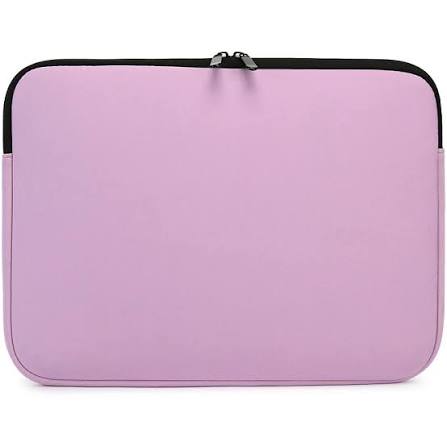
Neoprene is a popular material for laptop bags because of its flexibility, lightweight construction, and soft cushioning properties. A quality Neoprene Laptop Bag can help protect electronic devices from scratches, minor impacts, and light moisture exposure. However, regular care is necessary to maintain the material’s appearance and performance. Understanding the correct cleaning methods can help prevent unnecessary damage and extend the useful life of the bag.
Understanding Neoprene Before Cleaning
Neoprene is a synthetic rubber material commonly used in protective accessories, sports equipment, and insulation products. Its flexible structure and slightly spongy texture make it suitable for laptop sleeves and carrying cases.
Although neoprene is relatively durable, improper cleaning can affect its appearance and flexibility. Strong chemicals, excessive heat, and rough scrubbing may damage the material over time.
Before cleaning a laptop bag, it is important to understand its construction. Some products include additional fabric linings, zippers, reinforced stitching, and decorative components that may require different cleaning methods.
1. Remove Dust and Loose Dirt Regularly
Dust and loose particles can accumulate on the exterior and interior surfaces of a laptop bag. If ignored, these particles may cause surface marks or transfer onto the laptop.
Regular dust removal is one of the simplest ways to maintain the condition of neoprene.
Follow these steps:
- Remove the laptop and all accessories from the bag.
- Turn the bag upside down to remove loose debris.
- Use a soft, dry cloth to wipe the exterior.
- Gently clean the interior to remove dust and small particles.
- Check corners and zipper areas where dirt may collect.
Avoid using hard brushes or sharp objects because they may damage the material.
2. Use Mild Soap and Water for General Cleaning
For everyday stains and surface dirt, mild soap and water are generally sufficient.
A simple cleaning process can help remove accumulated grime without exposing neoprene to harsh chemicals.
Step-by-Step Cleaning Method
- Mix a small amount of mild soap with lukewarm water.
- Dampen a soft cloth or sponge with the cleaning solution.
- Gently wipe the affected areas.
- Use another clean, damp cloth to remove soap residue.
- Allow the bag to air-dry completely before storing or using it.
Avoid soaking the bag unless the manufacturer specifically recommends washing it that way. Excessive moisture may affect internal linings, adhesives, and other components.
3. Treat Stains as Soon as Possible
Fresh stains are generally easier to remove than marks that have been left on the material for a long time.
Food residue, ink, beverages, and dirt can affect the appearance of a laptop bag if they are not cleaned promptly.
Different stains may require slightly different approaches.
Food and Beverage Stains
Remove loose residue carefully using a soft cloth. Then clean the affected area with mild soapy water.
Dust and Mud Marks
Allow wet mud to dry before gently removing loose particles. Wipe the remaining marks with a damp cloth.
Ink Stains
Ink can be difficult to remove from certain neoprene surfaces. Avoid applying strong solvents without checking the manufacturer’s cleaning instructions, as they may discolor or damage the material.
For stubborn stains, test any approved cleaning product on a small, hidden area first.
4. Allow the Bag to Air-Dry Properly
Drying is an important part of neoprene maintenance. Even though the material naturally resists some moisture, trapped water can create unpleasant odors and affect other bag components.
After cleaning, remove excess moisture using a soft towel. Place the bag in a well-ventilated area and allow it to dry naturally.
Keep these precautions in mind:
- Avoid placing the bag directly under strong sunlight for extended periods.
- Do not use hair dryers or high-temperature heating devices.
- Avoid storing the bag while it is still damp.
- Ensure the interior is completely dry before inserting a laptop.
Proper drying helps preserve the material’s condition and reduces the risk of odor development.
5. Clean Zippers and Stitching Carefully
Zippers and stitching are important structural components of laptop bags. Dirt, dust, and small particles can collect around zipper teeth and seams, making closures difficult to operate.
To maintain these areas, use a soft brush or dry cloth to remove loose debris. Clean around the zipper carefully without applying excessive water.
Inspect stitching periodically for loose threads, damaged seams, or separation around corners.
If a zipper becomes difficult to operate, avoid forcing it. Check for trapped fabric or debris and clean the affected area gently.
6. Avoid Harsh Chemicals and Abrasive Cleaning Tools
Neoprene can be affected by certain cleaning products and rough handling. Using unsuitable chemicals may cause discoloration, surface deterioration, or loss of flexibility.
Avoid the following unless the manufacturer specifically approves them:
- Bleach and strong chemical cleaners.
- Harsh solvents and industrial cleaning agents.
- Abrasive scrubbers and stiff brushes.
- Excessively hot water.
- Aggressive stain-removal products.
Mild cleaning solutions and soft materials are generally more appropriate for routine maintenance.
7. Prevent Unpleasant Odors
Laptop bags may develop unpleasant smells when exposed to sweat, food residue, moisture, or poor storage conditions.
Preventing odor buildup is easier than removing strong smells later.
Consider these practices:
- Empty the bag regularly.
- Remove food wrappers and other waste immediately.
- Clean the interior when necessary.
- Allow the bag to dry completely after exposure to moisture.
- Store it in a ventilated location.
- Avoid keeping damp clothing or wet accessories inside.
If an odor persists, check the manufacturer’s care recommendations before using specialized odor-removal products.
8. Store the Laptop Bag Correctly
Proper storage helps maintain the shape and flexibility of neoprene. Leaving a bag compressed under heavy objects for long periods may affect its appearance.
When the bag is not in use, keep it in a clean, dry location away from excessive heat and direct sunlight.
Additional storage tips include:
- Keep the bag away from sharp objects.
- Avoid placing heavy items on top of it.
- Store it in its natural shape whenever possible.
- Make sure it is completely dry before storage.
- Keep it away from areas with excessive humidity.
These simple habits can help prevent unnecessary material stress.
9. Avoid Overloading the Bag
Carrying too many accessories can place additional pressure on the material, zippers, and stitching.
Although neoprene has some natural elasticity, repeatedly stretching the bag beyond its intended capacity may affect its shape and structural condition.
Avoid forcing oversized chargers, external drives, notebooks, and other accessories into compartments designed for smaller items.
Choosing a bag with sufficient storage capacity is a better approach for people who regularly carry multiple accessories.
10. Inspect the Bag for Signs of Wear
Regular inspection helps identify minor problems before they become more serious.
Check the following areas periodically:
| Bag Component | What to Inspect | Recommended Action |
|---|---|---|
| Exterior surface | Stains, discoloration, or damage | Clean using suitable methods |
| Interior lining | Dust, debris, and loose fabric | Clean gently |
| Zippers | Sticking or damaged teeth | Remove debris and inspect |
| Stitching | Loose threads or open seams | Arrange appropriate repairs |
| Corners | Signs of thinning or wear | Check protective condition |
| Handles | Loose attachments or damage | Repair if necessary |
If the material becomes significantly damaged, replacing the bag may be more practical than continuing to use it for laptop protection.
Common Cleaning Mistakes to Avoid
Even simple maintenance routines can cause problems if unsuitable cleaning methods are used.
Some common mistakes include:
Using excessive water: Too much moisture can affect internal linings and other components.
Applying strong chemicals: Harsh cleaners may damage the material or change its color.
Drying with direct heat: High temperatures can affect neoprene’s flexibility and shape.
Ignoring interior dirt: Dust and small particles inside the bag may scratch the laptop surface.
Storing the bag while damp: Moisture trapped inside can contribute to unpleasant odors.
Using rough cleaning tools: Abrasive materials may damage the surface and stitching.
Avoiding these mistakes helps maintain the bag’s protective qualities and appearance.
How Often Should You Clean a Neoprene Laptop Bag?
Cleaning frequency depends on how often the bag is used and the environments in which it is carried.
For regular users, a light weekly inspection and dust removal can help prevent dirt accumulation. More thorough cleaning may be necessary when visible stains appear or the bag becomes noticeably dirty.
A practical maintenance schedule may look like this:
| Maintenance Activity | Suggested Frequency |
|---|---|
| Remove loose dust | Weekly |
| Inspect interior and exterior | Weekly |
| Clean visible stains | As soon as possible |
| Check zippers and stitching | Monthly |
| Perform general surface cleaning | When needed |
| Check storage condition | Before extended storage |
These are general recommendations rather than fixed requirements. Always consider the manufacturer’s care instructions.
Conclusion
Maintaining a neoprene laptop bag does not require complicated cleaning procedures. Regular dust removal, mild soap and water, proper drying, and careful storage can help preserve the material’s flexibility and appearance.
Avoiding harsh chemicals, excessive heat, overloading, and improper washing methods is equally important. By paying attention to zippers, stitching, interior cleanliness, and signs of wear, users can maintain their laptop bags in good condition for longer.
A consistent maintenance routine helps ensure that a neoprene bag continues to provide convenient cushioning, everyday scratch protection, and practical portability for students, professionals, and frequent travelers.